|
|
 |
 |
| |

Aircraft
Configuration Manager (ACM) Screens
The ACM is your interface to customizing loadouts,
fuel, preferences and failures. An easy to use and
intuitive interface quickly gets you loaded out and
ready for flight. The weapons and fuel you load
determine how much you weigh and how much drag the
aircraft is towing. Release a weapon in flight and the
weight and drag are removed along with it. |
| |
|
| |
|
|
|
|
|
 |
|
 |
|
 |
|
Custom Loadouts |
|
Fueling Interface |
|
Failure System |
|
Any weapon, pod, or store on any [allowable] station. No
limited, pre-defined loadouts using multiple models.
Just one model, and thousands of combinations.
See what the loadout will cost in terms of weight and
drag before you fly. |
|
Based on what's loaded, the fuel interface lets you
choose exactly how much gas you need to get the job
done. The preflight summery window (left of main screen)
tells you how much you need to burn before a safe
landing is possible. |
|
In addition to optional battle damage from SAM and AAA
fire, a more traditional random failure system can be
used to arm an extensive variety of systems failures. |
| |
|
|
|
|
|
 |
|
 |
|
 |
|
Built-In Carrier Ops |
|
Have It Your Way
(at VRS) |
|
Reference Screen |
|
Using our system, you can define carrier catapult and
arrester zones for any freeware or payware carriers.
It's everything you need for FS9 except the boat. The
built-in system can be disabled if you wish to use a
third-party system such as Flight Deck or 3-wire. |
|
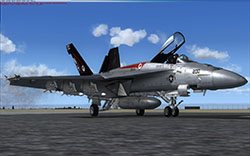
The VRS F/A-18E is not just an aircraft; It's an
experience in quality through and through. Features like
native widescreen support (aspect ratio is important
even in a VC), and options for everything you can
imagine, all add up to a remarkable experience. |
|
The aircraft kneeboard checklist and reference
documentation can be viewed right within the ACM. Not
sure if you can catapult with 5 full tanks? Look it up
before you fly. |
| |
|
|
|
|
|
Note: some screens may
represent a developmental version of this product. |
|
 Experience the most detailed and accurate simulation of a combat
aircraft ever developed for Microsoft Flight Simulator. We think
you'll agree, the depth of the simulation is second to none,
making this an investment you can be proud to add to your
collection.
Almost 5 Years in the Making
The
VRS F/A-18E "Superbug"
for Microsoft Flight Simulator 2004 & FSX, is the culmination of
almost 5 years of work by some of the add-on industry's most
talented artists, programmers and flight dynamics gurus. The
F/A-18E is painstakingly modeled in every detail. From avionics
to weapon systems, if it's in the real aircraft, it's probably
in this
simulation!
Avionics Designed from the Navy's NATOPS
Flight Manual
Avionics are the heart of this "glass" combat aircraft, and no
compromises in realism were made to bring you the first truly
accurate simulation of this aircraft's combat and navigation
systems. Four digital displays provide data for navigation,
stores management, targeting, sensors, fuel systems, engine
systems, and flight advisory. With over 40 individual
interactive displays, nothing was left to the imagination.
Highly Realistic Sensor and Targeting
Simulation
Short of actually shooting down AI aircraft, sensor and
targeting systems are simulated just as their real-world
counterparts. You can lock up AI aircraft and receive feedback
to the HUD, radar and early warning systems, just as if you were
in an electronic military exercise -- the only thing missing is
the lethality. The radar simulation takes a number of factors
into consideration, including signal strength (range), aspect
angle, closing velocity (Doppler shift), and more. A total of 8
radar modes (4 primary and 4 ACM sub-modes) are simulated.
Unmatched Virtual Cockpit Quality &
Speed
Although the simulation is heavily focused on avionic systems,
we haven't ignored little indulgences like "eye candy". The VRS
F/A-18E sports a stunningly beautiful and completely
"flyable" Virtual Cockpit in which 100% of the controls are
functional 3D components rather than "projected" 2D maps. The VC
and external models feature a set of extremely high resolution
textures for the ultimate in visual clarity. Gauge update rates
in the VC are optimized for the fastest possible response. Four
types of interior lighting including panel transillumination,
flood, and night vision modes provide a completely immersive
environment. Animated shadows for many of the controls further
enhance the "suspension of disbelief".
Extensive Hand-Drawn, High-res 2D
Sub-panels
Although VCs are becoming quite the norm, we also realize and
appreciate those who prefer their "office" in 2D. The aircraft
features over a dozen 2D panels in native 1600x1200 resolution,
all hand-crafted and extremely clean. A unique "Panel Navigator"
pop-up can be used to quickly find the system you need.
Professionally Designed Aircraft
Management Application
A very comprehensive Aircraft Manager application is included
for loading out an extensive set of weapons and pods, as well as
configuring fuel, failures and preferences. In total, the number
of combinations of stores which can be carried is in the
thousands. Schematics for all major systems including
electrical, environmental, fuel, and hydraulic are interactive
and show you exactly which systems will be affected by the
failure(s) you've chosen. Failures can be immediate or randomly
generated for any system.
Procedural Animation System
A single model file with procedurally animated components
handles all firing, jettisoning and dropping. Each of the 11
loadout stations can be individually dropped/fired with a
corresponding decrease in weight and drag. The external model
features folding wings, tailhook, avionic bay doors, ECS
auxilliary duct doors, complex flight control system-slaved
primary control surfaces, opening nosecone with working (and
tracking) radar dish, deployable boarding ladder, and much much
more. We've also designed a procedurally animated air-to-air
refueling system, or "Buddy Store", which can by carried on the
aircraft so that it may act as a tanker. The entire refueling
process is simulated in intricate detail right down to the
cockpit-installed aerial refueling panel. This is quite simply
the most advanced animation system you're going to find on a
combat aircraft for MS Flight Simulator.
|

The following system requirements must be met to at
least the minimum requirement (FS9) in order to run the VRS
Superbug. The Ultimate requirements are
obviously not necessary, but will greatly enhance
your flying experience. If you plan to fly FSX, we
recommend a dual core system and a 512+ MB graphics card
(DX9 compatible is fine).MSFS is generally a
CPU-bound application. This means that above a certain
point your GPU (graphics processor) becomes less
important than your CPU (system processor). The
following figures for Minimum, Average and
Ultimate frame rates should only serve as a
guide. There are far too many variables associated with
Flight Simulator and the VRS SuperBug to make accurate
predictions. Think of them as percentages. A word
about performance:
The VRS Super Hornet is a high-end simulation of a
high-end aircraft. Obviously it's not a Cessna or a Spitfire,
loaded with relatively simplistic analog gauges and
control systems. The real aircraft contains many hundreds of thousands of
mechanical and electrical parts. Our simulation, albeit
to a lesser extent, also contains many thousands of
"parts". These systems don't come free; the price is CPU
power. In terms of multi-core systems, the number of
cores is completely irrelevent since FS is not
multi-threaded. However these newer Dual and Quad core
CPUs ARE much faster per clock cycle than the previous
generation of processors, even running FS under a single
core. A much cheaper dual core processor with a
faster clock will beat any quad core at a slower clock
when running FS9 or FSX. That $999 Extreme Quad Core
running under 3Ghz WILL be slower than a $150 3.16Ghz
Dual Core when running FS, as will be the case with most
current generation games. |
| |
|
Component |
Minimum
Expect poor overall frame rates, but flyable
over non-populated areas. Consider FSX out of the
question. |
Average
Expect typical FS9 frame rates between 20-30FPS.
Expect FSX* frame rates between 12-20FPS. |
Ultimate
Expect FS9 frame rates between 27-50FPS. Expect
FSX* frame rates between 20-35FPS. |
| MSFS: |
FS2004 |
FS2004 |
FS2004/FSX |
| OS: |
Windows 2000/Windows XP |
Windows XP |
Windows
XP/Windows Vista |
| RAM: |
512MB |
1GB |
2+ GB |
| CPU: |
Single core
Intel or AMD
equivalent 2.0Ghz |
| | |